














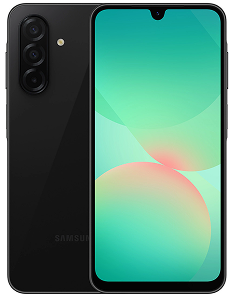

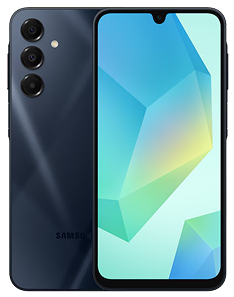
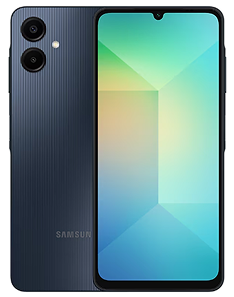


Get Your Samsung Device with DITO in 6 Steps!
-
1
 Customer visits DITO Experience Store
 -
2
.svg) Customer chooses a Mobile
Customer chooses a Mobile
Postpaid SIM-Only Plan plus his
Preferred handset -
3
 Customer will apply for
a loan via Samsung
Finance+ -
4
.svg) Once SF+ is approved, customer will fill up a Mobile Postpaid Application and submit documents
Once SF+ is approved, customer will fill up a Mobile Postpaid Application and submit documents -
5
.svg) Once Postpaid application is approved, customers settles 20% DP to DITO and AMSF.80% balance to Union Bank through Samsung Finance +
Once Postpaid application is approved, customers settles 20% DP to DITO and AMSF.80% balance to Union Bank through Samsung Finance + -
6
.svg) Customer receives his DITO Postpaid sim and insert it to his new Samsung device
Customer receives his DITO Postpaid sim and insert it to his new Samsung device


%201.png)

Scan the QR Code to Fill Out Your Application Form

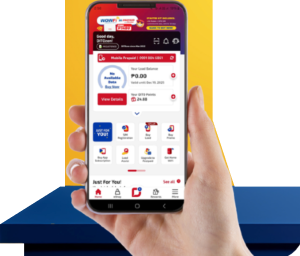
Personalize and maximize your DITO experience, all in one app.
Download the DITO app today.
Learn More
Need More Help?
Get details about billing, perks and rewards, available payment channels, and more
Learn More
.png)
Frequently Asked Questions
What is Samsung Finance+?
Samsung Finance+ is a super convenient way to own your favorite Samsung device without paying the full price upfront. You can pay through easy monthly installments — with 0% interest, no processing fees, and even as low as 0% down payment!
Who can apply for Samsung Finance+?
It’s open to both new and existing DITO subscribers who want to get a new SIM-Only plan bundled with a Samsung handset. Easy, right?
How much is the late payment fee for Samsung Finance+?
If you miss a payment, a late fee will be charged based on how long the payment is overdue:
• 30 days past due: ₱150
• 60 days past due: ₱300
• 90 days past due: ₱450
(The fee increases by ₱150 every 30 days past the due date.)
Where can I avail of the Samsung Finance+ promo?
You can avail of the Samsung Finance+ promo at any of our DITO Experience Stores nationwide! Visit the nearest store, and our friendly team will guide you through the easy application process.
What FLEXPlans can I apply for with Samsung Finance+?
You can pair your Samsung Finance+ handset with any of these SIM-Only FLEXPlans:
• FLEXPlan 888
• FLEXPlan 1288
• FLEXPlan 1688
Pick the plan that best fits your lifestyle and enjoy a smooth, flexible experience with DITO!
Is there a processing fee if I avail of Samsung Finance+?
Nope! There are no processing fees when you apply for Samsung Finance+, as it’s handled by UnionBank.
What are the available loan terms for Samsung Finance+?
For now, you can only available of a 6 month payment term.
What are the requirements for applying for Samsung Finance+?
You only need one (1) valid ID — any of the following will do:
• Passport
• Driver’s License
• UMID
• PhilSys ID
Quick and easy!
How can I pay my Samsung Finance+ bill?
Super easy! You can pay your bill directly through the Samsung Finance+ app on your Samsung device — quick, safe, and hassle-free!
What Samsung devices can I purchase using Samsung Finance+?
You can choose from these awesome Samsung 5G devices:
• Samsung Galaxy A06 5G
• Samsung Galaxy A16 5G
• Samsung Galaxy A26 5G
All available through Samsung Finance+ with easy monthly payments!
Is there any interest charged on Samsung Finance+?
Nope! Samsung Finance+ offers 0% interest — so you can enjoy your new device without worrying about extra charges.
Can I avail more than one Samsung Finance+ loan?
You can only have one (1) active Samsung Finance+ UnionBank loan at a time. Once you’ve completed your final monthly payment, you can apply for a new Samsung Finance+ loan.
What happens if my Samsung Finance+ application is approved?
Once your Samsung Finance+ application is approved, you can get your chosen Samsung smartphone, postpaid line and start enjoying it under your approved installment plan — easy and hassle-free!
What happens if my Samsung Finance+ application is disapproved?
If your Samsung Finance+ application isn’t approved, you won’t be able to avail of the offer through the financing option. But don’t worry — you can still choose to purchase the device through other available payment methods.
How do I manage my DITO Postpaid FLEXPlan?
Super easy! You can manage your DITO Postpaid account right from the DITO App — check your data usage, view and pay your bills, and even manage your add-ons all in one place.
If I have an issue with my installment payment, can DITO help me?
The installment payment is handled directly between the applicant and Samsung Finance+ (UnionBank). DITO Telecommunity isn’t involved in payment concerns or settlements — but don’t worry, you can reach out to Samsung Finance+ customer support for assistance with your payment issues.
Can I avail of Samsung Finance+ if I'm already a DITO Postpaid subscriber?
Yes, you may apply once your lock-in period with your current postpaid plan has ended or if you wish to avail of an additional line.
Can I apply for Samsung Finance+ if I already have another ongoing device loan?
If you currently have an active device loan under Samsung Finance+, you’ll need to complete your existing contract before applying for a new one.
Is Samsung Finance+ available for prepaid customers?
Samsung Finance+ is exclusive to DITO Postpaid applicants. If you’re a prepaid subscriber, you can switch or apply for a DITO Postpaid FLEXPlan to qualify for the offer.
Is Samsung Finance+ available nationwide?
Yes! Samsung Finance+ is available at our DITO Experience Stores nationwide. You can find the store nearest you by checking this link: https://dito.ph/experience-stores.
How long does it take to process my Samsung Finance+ application?
The review and approval usually happen within the same day once all your requirements are submitted and verified. Some applications may take a bit longer if additional verification is needed.
Can I reapply if my Samsung Finance+ application was disapproved?
Yes, you can! You may reapply after addressing the reason for disapproval, after 3 months or the required waiting period, depending on Samsung Finance+’s assessment. For guidance, it’s best to ask our store team before submitting a new application.
Do I need to present proof of income when applying?
Yes, you’ll need to submit a valid proof of income — like payslips, a Certificate of Employment (COE), or bank statements — to help with the credit evaluation for Samsung Finance+. Additional documents might be requested if needed.
Can I apply online or only in physical DITO stores?
For now, Samsung Finance+ applications are available in-store only at participating DITO Experience Stores. Stay tuned — online applications may be available soon!
Where can I check my remaining balance or payment schedule?
You can easily view your remaining balance, payment schedule, and due dates through the Samsung Finance+ app on your Samsung device.
Where can I check my remaining balance or payment schedule?
You can easily view your remaining balance, payment schedule, and due dates through the Samsung Finance+ app on your Samsung device.
Can I use an eSIM when getting a device through Samsung Finance+?
Unfortunately, no. Only a physical SIM can be used when applying for Samsung Finance+. Applications using an eSIM will not be accepted.
Why was my Samsung Finance+ application not approved?
Your application may be disapproved if you have an active loan with UnionBank. For assistance, you may coordinate directly with UnionBank to check your loan status or resolve any concerns before reapplying.
Is there a minimum annual income required to apply for Samsung Finance+?
Yes. To qualify for Samsung Finance+, you must have a minimum annual income of PHP 180,000. Meeting this requirement helps ensure eligibility for the financing program.


You may also reach us out
via our official social media accounts


 Get App
 Get SIM