

.svg)

The DITO Starter Pack is a ₱39 prepaid SIM pack that offers up to 25GB of bonus data, Unlimited All-Net Texts, Unlimited DITO-to-DITO Calls, and 100 minutes of calls to other mobile networks. Upon activation, users immediately receive 3GB of high-speed data, with additional bonus data available through app registration and eligible promo subscriptions. The starter pack benefits are valid for 15 days.
The DITO Starter Pack is priced at Php39.
The DITO Starter Pack is available via DITO Experience Stores, DITO Retail Partner Stores, Lazada, and Shopee.
You can also purchase of the DITO Starter Pack through the following channels:
- E-Shop in our DITO APP
- DITO Experience Stores
- Retail Partners:
- 7-Eleven
- M-Lhuillier
- Cebuana Lhuillier
- Robinsons Department Stores
- Authorized distributors and retailers
You can activate your DITO SIM Card in just 6 easy steps!
- Insert the SIM card into your phone.
- Enable mobile data.
- Click on the SIM registration link received via SMS.
- Download the DITO App.
- Register the SIM card.
- Once registration is complete, the SIM card will be activated.
Yes. Your new promo subscription will activate upon availment but consumption of data, calls, and texts will be based on the shortest validity. Example: If you subscribe to a 30-day promo while you still have remaining DITO Starter Pack inclusions expiring in 2 days, your DITO Starter Pack inclusions will be consumed first. Once you have fully consumed your DITO Starter Pack inclusions, usage will be shifted to the newly subscribed promo.
You may buy the DITO SIM via the DITO eShop, DITO Experience Stores, DITO App, Lazada, Shopee, and our retail partner stores.
To access the DITO eShop, use the sign up QR code found in the DITO Telecommunity Website. To check the list of our partner stores, click here.
You can activate your DITO SIM in just 6 easy steps!
1) Insert the SIM card into your phone.
2) Enable mobile data.
3) Click on the SIM registration link received via SMS.
4) Download the DITO App.
5) Register the SIM card.
6) Once registration is complete, the SIM card will be activated.
The DITO SIM priced at ₱39 comes with up to 25GB bonus data, Unlimited All-Net Texts, Unlimited DITO-to-DITO Calls, and 100 minutes of calls to other mobile networks valid for 15 days. This is available via the DITO eShop, DITO App, DITO Experience Stores, Retail Partner Stores, Lazada, and Shopee.
The DITO SIM priced at ₱199 comes with 20GB All Access Data, Unlimited Texts to All Mobile Networks, Unlimited DITO-to-DITO Voice and Video Calls (ViLTE), 300 minutes of calls to other mobile networks, Prime Video Mobile Access, and free 1GB per day for Viber, valid for 30 days. This is available via the DITO eShop, DITO App, Lazada, and Shopee.
The DITO SIM priced at ₱129 comes with 12GB All Access Data, Unlimited Texts to All Mobile Networks, Unlimited DITO-to-DITO Voice and Video Calls (ViLTE), 300 minutes of calls to other mobile networks, Prime Video Mobile Access, and free 1GB per day for Viber, valid for 30 days. It also includes an additional 4GB bonus data upon downloading, signing in, and updating your profile on the DITO App, valid for 7 days, plus free Viber Plus and Viber Dating Premium valid for 3 months. This is available via the DITO eShop, DITO App, Lazada, and Shopee.
Estimated delivery lead times for DITO SIM orders from the DITO eShop are as follows: NCR: 2–4 business days; North Luzon/South Luzon: 3–5 business days; Visayas: 2–5 calendar days; and Mindanao: 2–5 calendar days. You may track the status of your order using the link provided in your confirmation email.
For purchases made via the DITO eShop or DITO App, delivery is handled by third-party couriers and may be subject to shipping fees depending on your address. For purchases made via Lazada or Shopee, delivery is handled by their partner couriers and may also be subject to shipping fees based on your location, subject to their respective terms and conditions.
You can check your order status via the link provided in the confirmation email.
You can top-up load through the following channels:
ONLINE
• DITO App
• MyDITO
• Lazada
• GrabPay
• GCash
• Paymaya
• BPI
• Coins.ph
• Bayad App
• WeChat
• Alipay
• ML Wallet
• Load Central OFFLINE
• DITO Experience Stores
• MLhullier
• Bayad Center
• 711 / Cliqq
• Touch Pay
• Pay & Go
• FS de Leon
• Load Central
• Load Manna
• Telepreneur
• Other Retail Partner Stores
Yes. You can apply for a DITO Mobile Postpaid FLEXPlan via the following channels:
1. DITO App
2. DITO Experiences Stores
3. Device Retail Partners
If you use the DITO SIM in a non-compatible phone, you may not be able to experience all the features of our service. You can still enjoy our data services and get the same HIGH-SPEED DATA experience if you are within DITO-covered areas. However, non-data services like VoLTE calls, regular calls and texts may not work.
You can set-up your DITO SIM in just 4 easy steps:
1. Insert your new DITO SIM on your mobile phone.
2. Go to “Settings” and click “Mobile Network”. Then choose “Access point name”
3. Click “Add button” and manually type “Internet.dito.ph” on the APN field. After that, click “Save”
4. Open your “Mobile Data”. You will receive a Welcome SMS once your DITO SIM is activated. DITO App Download link and initial password to login is also included.
The DITO Starter Pack offers the following inclusions:
- DITO SIM Card
- Up to 25GB data
- Unlimited DITO-to-DITO calls
- Unlimited DITO-to-DITO SMS
- 100 minutes of calls to other mobile networks
- Unlimited texts to other mobile networks
You can acquire the full 25GB data allowance by following these steps:
Step 1: Activate your SIM to receive 3GB of data, valid for 5 days, plus an additional 3GB of 5G data, also valid for 5 days. The 5G data can only be utilized by subscribers with 5G phones in designated 5G-covered areas, including NCR, Cebu City, Mandaue City, Davao City, Angeles, San Fernando (Pampanga), San Pedro (Laguna), Bacoor City (Cavite), and Bacolod City (Negros Occidental).
Step 2: Download the DITO App, sign in, and update your profile to receive 4GB of data, valid for 3 days.
Step 3: Subscribe to any Level-Up pack (excluding Auto Pay and Advance Pay) on the same day you activate your SIM to receive 3GB of data, valid for 3 days. You will also receive an additional 1GB of data, valid for 7 days, for each of your first 12 Level-Up subscriptions, totaling 12GB of bonus data.
Your data wallet will start using the data with the shortest validity first. You can keep track of the validity of your
DITO Starter Pack data inclusions through the DITO APP.
No, your DITO Starter Pack data cannot be shared with any DITO number.
First, you must register your SIM. Go to SIM Registration - DITO Telecommunity to be guided on how to register your SIM. Once you have successfully registered, your SIM will activate.
You can avail of the regular load and promo via the DITO APP, DITO Experience Stores, partner retail stores, Lazada, and Shopee.
Yes, you may share your load credits via your DITO App or MyDITO account for free! You are allowed to share P5.00 - P1,000.00 per transaction with a maximum of 5 transactions per day. Please take note that a maintaining balance of P1.00 is required and you cannot transfer all of your load credits.
You may share as much as you want as long as you have enough data.
Shared data is valid for 48 hours.
If you received data from another subscriber while you still have remaining shared data from a previous transaction, the validity of your total shared data will be extended for another 48 hours.
DITO Level-Up Packs are the all-in subscriptions of DITO that allow you to enjoy all-access high-speed data plus unli all-net texts, unli DITO-to-DITO calls, and 300 minutes of calls to other mobile networks for 30 days.
Here are the inclusions of the Level-Up Packs:
| DITO LEVEL-UP PACKS | |||||
|---|---|---|---|---|---|
| DITO LEVEL-UP 99 | DITO LEVEL-UP 199 | DITO LEVEL-UP 299 | DITO LEVEL-UP 499 | DITO LEVEL-UP 999 | |
| Price | Php 99 | Php 199 | Php 299 | Php 499 | Php 999 |
| Data | 7GB | 16GB | 28GB | 55GB | 120GB |
| Calls | Unlimited DITO-to-DITO calls 300 mins. of calls to other mobile networks | ||||
| Text | Unlimited texts to all mobile networks | ||||
| Validity | 30 days | ||||
DITO Level-Up Packs are available to all DITO prepaid subscribers.
"You can view and avail the DITO Level-Up Packs via the DITO APP, MyDITO, DITO Experience Stores, partner retail stores, Lazada, and Shopee.
Via the DITO APP/MyDITO:
1. Log-in to DITO App/MyDITO using your credential.
2. Click ""Buy/Manage Promo"" in the homepage.
3. Choose your preferred DITO LEVEL-UP Pack.
4. Choose your preferred payment method and complete the payment process.
5. Await confirmation message of your successful DITO Level-Up Pack purchase.
Via the DITO Experience Stores/partner retail stores:
1. Visit the DITO Experience Store / Retail Partner Store near you.
2. Purchase your preferrred DITO LEVEL-UP pack.
3. Await confirmation message of your successful DITO Level-Up Pack purchase. "
Yes, you can share your data allowance with another DITO subscriber while you have a Level-Up Pack. You can share your data via your DITO APP or MyDITO account for free! You are allowed to share a minimum of 50MB per transaction with a maximum of 5 transactions per day.
Yes, you can resubscribe to the same regular DITO Level-Up Pack. Remaining consumable data and calls to other mobile networks will rollover to your new subscription and the expiration will be adjusted based on your subscription with the longest validity.
Yes, you can subscribe to a different regular DITO Level-Up Pack even while you're currently subscribed to another one. Remaining consumable data and calls to other mobile networks will rollover to your new subscription and the expiration will be adjusted based on your subscription with the longest validity.
Yes, you can have a DITO Advance Pay subscription even while you're subscribed to a regular DITO Level-Up Pack, however, your data allowances will not stack and will still expire based on their respective validities.
Yes, you can enroll to a DITO Level-Up Pack with Auto Pay even while you're subscribed to a regular DITO Level-Up Pack. Remaining consumable data and calls to other mobile networks will rollover to your new subscription and the auto-renewal will be adjusted based on your subscription with the longest validity.
If you have multiple promo subscriptions and your data allowances are in separate data wallets, your subscription with the shortest validity will be consumed first.
Yes, you can view your remaining data allowance via your DITO APP or MyDITO account.
"You will receive notifications when you reach certain thresholds.
100GB
50GB
10GB
5GB
3GB
1GB
500MB"
"You will receive notifications when you reach certain thresholds.
60 minutes
30 minutes
10 minutes"
The DITO Level-Up Socials promos allow you to enjoy both all-access data and app-based data (for Facebook, Messenger, IG, WhatsApp and Threads).
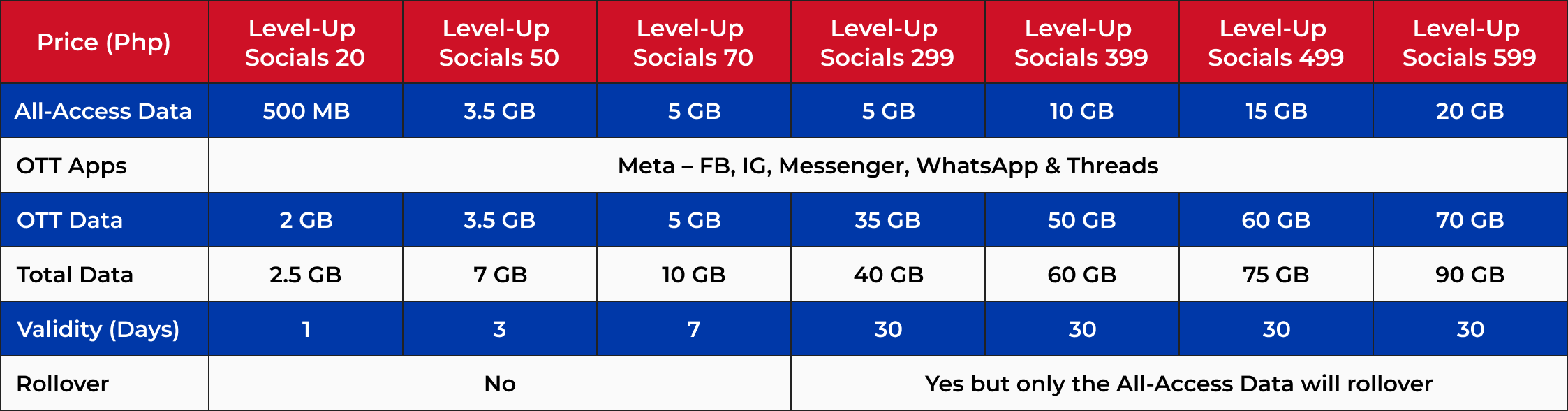
DITO Level-Up Socials promos are available to ALL DITO mobile prepaid subscribers.
It’s easy! You can buy the enhanced DITO Level-Up Socials promos in through the DITO App, at DITO Authorized Retailers and Partner Stores, DITO Experience Stores, and through Online/Digital Partners.
If you have multiple active promos with separate data wallets, your data from the promo that expires soonest will be used first.
-
It depends on which DITO Level-Up Socials you’re subscribed to! For Level-Up Socials 20, 50, and 70, any unused data, both the remaining all-access and app-based data, will not roll over to your new subscription.
-
For Level-Up Socials 299, 399, 499, and 599, only the unused all-access data will roll over to your new subscription. The validity of the rolled-over data will match the promo with the longest validity among your active subscriptions. However, the app-based data will not roll over.
-
It depends on which Level-Up Socials you’re subscribed to! For Level-Up Socials 20, 50, and 70, both the all-access and app-based data are not shareable. For Level-Up Socials 299, 399, 499, and 599, you can share the all-access data with others. However, the app-based data is not shareable. 8. How many times can I buy the enhanced DITO Level-Up Socials promos?
-
No limit! You can buy the enhanced DITO Level-Up Socials promos as many times as you want during the promo period.
-
You can avail any of the DITO Level-Up Socials Promos multiple times within the promo period.
If you already have an active DITO Level‑Up Socials subscription (with consumable data for Facebook, Threads, Instagram, Messenger, WhatsApp), you’ll continue using that data until your current subscription expires. Once you subscribe to the enhanced DITO Level-Up Socials, you’ll start enjoying to those social apps.
DITO Auto Pay is a convenience feature that allows you to continuously enjoy your monthly DITO Level-Up Packs without having to manually resubscribe to an offer monthly or upon exhausting your data allowance. This feature automatically renews your data pack 24 hours prior to the expiration of your subscription or when you reach the 500MB threshold, depending on your chosen option.
All DITO subscribers can enroll to DITO Auto Pay via the DITO APP.
"You can enroll to DITO Auto Pay via the DITO APP upon promo subscription.
- Log in to DITO App using your credential
- Click ""Buy/Manage Promo"" in the homepage and choose your preferred promo.
- Select ""Subscribe to Auto Pay"" in the purchase options and choose your preferred Auto Pay option. You may choose both options and whichever comes first triggers renewal.
- Select your preferred payment method.
- Await confirmation message of your successful Auto Pay subcription"
DITO Auto Pay allows you to enjoy a hassle-free uninterrupted DITO mobile experience with continuous data pack subscription. You will also receive bonus mobile data for successful auto-renewal. Additionally, you are always in control because you can change or cancel your DITO Auto Pay settings until 48 hours prior to the renewal of your current subscription.
You will get bonus data depending on your DITO Level-Up Pack with Auto Pay subscription:
| DITO LEVEL-UP PACKS | |||||
|---|---|---|---|---|---|
| DITO LEVEL-UP 99 | DITO LEVEL-UP 199 | DITO LEVEL-UP 299 | DITO LEVEL-UP 499 | DITO LEVEL-UP 999 | |
| Price | Php 99 | Php 199 | Php 299 | Php 499 | Php 999 |
| Data | 7GB | 16GB | 28GB | 55GB | 120GB |
| Bonus Data | 1GB | 2GB | 3GB | 5GB | 10GB |
| Total Data | 8GB | 18GB | 31GB | 60GB | 130GB |
| Calls | Unlimited DITO-to-DITO calls 300 mins. of calls to other mobile networks | ||||
| Text | Unlimited texts to all mobile networks | ||||
| Validity | 30 days | ||||
You will get bonus data for every successful auto-renewed subscription.
DITO Auto Pay is available for the following products:
| Auto Pay Subscription | Bonus Data |
|---|---|
| DITO LEVEL-UP 99 | 1GB |
| DITO LEVEL-UP 199 | 2GB |
| DITO LEVEL-UP 299 | 3GB |
| DITO LEVEL-UP 499 | 5GB |
| DITO LEVEL-UP 999 | 10GB |
DITO Auto Pay payments are automatically deducted from your load balance. Just ensure that you have sufficient load balance in your account for a more convenient experience. Other payment options will be available soon.
There is no lock-in period for DITO Auto Pay. You may enable or disable DITO Auto Pay enrollment without any fees anytime until 48 hours prior to the renewal of your current subscription.
Any unused data allowance will be rolled over to the next subscription upon successful auto-renewal. The validity of your rolled-over data adjust based on the expiration of your renewed plan.
"DITO Auto Pay subscriptions can be changed via the DITO APP until 48 hours prior to the renewal of your current subscription.
- Log-in to DITO App using your credential
- Click ""Buy/Manage Promo"" in the homepage
- Click ""Manage Promo"" under ""My Promo' tab
- Click ""Change Promo"" in the ""Subscription Details"" page
- Choose your preferred promo
- Await confirmation message of your successful Auto pay promo update"
"DITO Auto Pay subscriptions can be cancelled via the DITO APP until 48 hours prior to the renewal of your current subscription.
- Log-in to DITO App using your credential
- Click ""Buy/Manage Promo"" in the homepage
- Click ""Unsubscribe"" in the ""My Promo"" tab
- Await confirmation message of your successful Auto pay subscription cancellation
Option to change your DITO Auto Pay subscription will be temporarily disabled until your DITO Auto Pay subscription renews. Once your DITO Auto Pay subscription renews, you may try again to modify your settings but changes will take effect upon the next auto-renewal date.
Once you have fully consumed your data allowance, you will not be able to access data until you purchase another data pack. By default, your DITO Auto Pay subscription will automatically renew 24 hours prior to the expiration of your plan. You also have an option to set the auto-renewal upon reaching the 500MB data threshold for a more convenient experience. You can modify this setting via your DITO APP.
"Yes, you can set when your data pack will auto-renew.
- Auto-renewal 24 hours prior to the expiration of your promo subscription (default)
- Auto-renewal upon reaching the 500MB data threshold or 24 hours prior to the expiration of the your promo subscription, whichever comes first.
You can modify this setting via your DITO APP."
Yes, you can share your data allowance from your DITO Auto Pay subscription. You can share your data via your DITO APP or MyDITO account for free! You are allowed to share a minimum of 50MB per transaction with a maximum of 5 transactions per day.
You can only avail one (1) DITO Auto Pay subscription within your account.
Currently, you can only avail a DITO Auto Pay subscription for your own DITO mobile number.
Your payment for DITO Auto Pay will be deducted from your load balance real time. An SMS notification will be sent for both successful and unsuccessful payments.
If you have insufficient load balance in your account, your DITO Auto Pay subscription renewal will not push through. When this happens, you will be notified for the unsuccessful auto-renewal. Your DITO Auto Pay subscription will be temporarily suspended if you have insufficient load balance upon the expiration of your subscription and you will have 30 days to top-up a sufficient amount. Once your account has a sufficient load balance, your DITO Auto Pay subscription will automatically reactivate.
After the expiration of your DITO Auto Pay subscription, you will have a 30 days to top-up and continue enjoying DITO Auto Pay. If your account fails to auto-renew within the 30 days, your DITO Auto Pay enrollment will be automatically cancelled.
"Yes, just avail any of the following promos via the DITO APP and select DITO Auto Pay as a payment option upon check-out.
DITO LEVEL-UP 99
DITO LEVEL-UP 199
DITO LEVEL-UP 299
DITO LEVEL-UP 499
DITO LEVEL-UP 999"
Yes, your remaining consumable data and calls to other mobile networks from your DITO Auto Pay subscription will stack with the inclusions of your new regular DITO Level-Up Pack and your auto-renewal date will be adjusted based on your subscription with the longest validity.
Yes, your remaining consumable data and calls to other mobile networks from your regular DITO Level-Up Pack will stack with the inclusions of your DITO Auto Pay subscription and your auto-renewal date will be adjusted based on your subscription with the longest validity.
No, if you currently have a DITO Auto Pay subscription you cannot subscribe to DITO Advance Pay, and vice versa
Your auto-renewal date will be adjusted based on your subscription with the longest validity. If you opted to renew your DITO Auto Pay subscription upon reaching the 500MB data threshold, your subscription will renew when your data allowance reaches the 500MB data treshold or 24 hours prior to the expiration of the your promo subscription, whichever comes first.
You can monitor your account via your DITO APP or MyDITO account. By default, your DITO Auto Pay subscription will automatically renew 24 hours prior to the expiration of your subscription. You also have an option to set the auto-renewal upon reaching the 500MB data threshold for a more convenient experience. You can modify this setting via your DITO APP.
Yes, you can view your remaining data allowance via your DITO APP or MyDITO account.
"You will receive notifications when you reach certain thresholds.
100GB
50GB
10GB
5GB
3GB
1GB
500MB"
"You will receive notifications when you reach certain thresholds.
60 minutes
30 minutes
10 minutes"
"You can avail the DITO LEVEL-UP Packs with SIM in the following channels:
- DITO eShop
- DITO APP
- Lazada
- Shopee"
"All DITO LEVEL-UP Packs available in DITO eShop and DITO APP are bundled with a FREE DITO SIM. DITO LEVEL-UP Packs 99, 199 and 299 which are available in Lazada and Shopee are bundled with a DITO Starter Pack.
| DITO LEVEL-UP 99 | DITO LEVEL-UP 199 | DITO LEVEL-UP 299 | DITO LEVEL-UP 499 | DITO LEVEL-UP 999 | |
|---|---|---|---|---|---|
| Inclusions | 7GB | 16GB | 28GB | 55GB | 120GB |
| Unli SMS | Unli SMS | Unli SMS | Unli SMS | Unli SMS | |
| Unli on-net calls, | Unli on-net calls, | Unli on-net calls, | Unli on-net calls, | Unli on-net calls, | |
| 300 mins of off-net calls | 300 mins of off-net calls | 300 mins of off-net calls | 300 mins of off-net calls | 300 mins of off-net calls | |
| Channels | DITO eSHop | DITO eSHop | DITO eSHop | DITO eSHop | DITO eSHop |
| Lazada | DITO APP | Lazada | Lazada (Soon) | Lazada (Soon) | |
| Shopee | Lazada | Shopee | Shopee (Soon) | Shopee (Soon) | |
| Shopee |
Mobile Number Portability (MNP) enables mobile phone customers to keep their number even when they switch networks or change their subscription from postpaid to prepaid and vice versa, free of charge. This is in compliance with RA 11202 (Mobile Number Portability Act), as part of DITO’s commitment with the government to help improve telco services in the Philippines.
There is no limit to the number of times of applying for the MNP. However, customers may reapply for porting to another network after the lapse of sixty (60) days from the date of activation of the ported number
MNP lets you keep your current mobile number when you switch to DITO. You can switch seamlessly to DITO free of charge!
You now have the freedom to choose your network provider while keeping your current mobile number.
You can choose to do number porting in two ways: external and internal.
External porting means switching from your current mobile network to another network or vice versa while keeping your existing mobile number.
Internal porting means switching between subscription plans within DITO, such as from prepaid to postpaid or vice versa. You may visit a DITO Experience Store for assistance with your porting request.
Yes, MNP allows you to switch network providers and subscription plans. However, DITO's postpaid plans are not yet available. You can visit www.dito.ph for updates about our postpaid plans.
Yes, you can. Please secure your Unique Subscriber Code (USC) from your current mobile service provider.
Mobile number porting has been commercially available in the Philippines since September 30, 2021. DITO continues to work closely with other network providers to make switching to DITO as seamless and hassle-free as possible.
Before making the switch to DITO, you must meet the following qualifications:
- You must not have any outstanding financial obligation with your Mobile Service Provider
- Your mobile number is not locked to any Mobile Service Provider
- You have no other porting request in the last 60 days
- Your mobile number is not prohibited from porting by a court of law
- You have not been blacklisted by a Mobile Service Provider due to previous fraudulent activities
- You must have an active mobile number
- Your mobile number must not be part of a bundled service/product from another Mobile Service Provider
- Your mobile number is not the principal contact number in a multi-number account
- Your mobile number must been activated for more than 60 days, newly activated numbers are not eligible for porting
- You must be within the DITO-coverage areas (See complete list)
NOTE: Calls and SMS are not guaranteed if using a non-DITO ready VoLTE mobile phone.
- Your Unique Subscriber Code (USC) from your current provider (the 9-digit code that will be issued by your current network provider to start the porting process).
- Government-issued ID
You will not be charged when you choose to switch network providers. You can switch seamlessly to DITO free of charge!
Apply for MNP from your current network provider and submit the required documents to receive your Unique Subscriber Code (USC). The USC will be valid for only 15 days. If expired, you will need to request for a new USC with your current provider. You can apply for port in (transfer to DITO) through one of our DITO Experience Stores or make an online request through the DITO App
VIA DITO App :
Step 1 : Go to DITO App and click on the “Switch DITO with your old number”.
Step 2 : Provide the necessary application details to proceed.
Step 3: Confirm SIM delivery details and settle payment for delivery fee
Step 4 : Wait for your free DITO SIM to arrive within 2-5 business days.Your new DITO SIM card comes with 1GB open data valid for 7 days. You will also receive one(1) DITO Bonus SIM card.The DITO Bonus SIM card comes with 1GB open data, Unlimited DITO to DITO calls & texts, and Unlimited text and 100 mins. calls to other mobile networks* valid for 7 days.
Step 5: Upon receipt of the FREE DITO SIM, open the DITO App and click the “Order Received, start the porting process” button to proceed.
Step 6: Indicate or scan the barcode to validate correct ICCID.
Step 7 : Wait for the notification that application is successfully submitted for validation. The SIM activation process will take about 24 to 48 hours. Within the period of the activation process, there might be a minimal service interruption. You will not be able to call, text or use data. However, the service interruption should take no longer than four (4) hours. To give you a hassle-free and seamless porting-in experience, you may use your DITO Bonus SIM card to continuously access calls, texts, and data during the potential downtime upon port in
Step 8: Once the porting process is already done, you will receive the onboarding email for the SIM and service activation steps.
VIA DITO Experience stores :
Step 1 : Secure your Unique Subscriber Code (USC) from your current mobile service provider.
Step 2: Visit a DITO Experience Store near you and apply for MNP
Step 3 : Present the following to our store specialists :
- One (1) valid ID
- Valid Unique Subscriber Code (USC) (expiry of USC is 15 days after issuance)
Step 4 : Upon confirmation of eligibility and submission of the complete requirements, our store specialists will process the request.
Step 5: Our Store specialists will hand over a free DITO SIM where your current mobile number will be activated once port in application is completed. We will also provide you a DITO Bonus SIM. The sim activation process will take about 24 to 48 hours. Within the period of the activation process, there might be a minimal service interruption. You will not be able to call, text or use data. However, the service interruption should take no longer than four (4) hours. To give you a hassle-free and seamless porting-in experience, you may use your DITO Bonus SIM to continuously access calls, texts, and data during the potential downtime upon port in.
Step 6: Once the porting process is done, you will receive the onboarding email for the SIM and service activation steps.
The duration of the porting process will depend as to where the porting application was requested:
If requested via DITO Experience Stores :
- Upon submission of application via DITO Experience stores, our store specialists will verify eligibility and ensure submission of complete requirements.
- Once confirmed, our store specialists will hand over a free DITO SIM where your current mobile number will be activated once port-in application is completed. We will also provide you a DITO Bonus SIM . The SIM activation process will take about 24 to 48 hours. Within the period of the activation process, there might be a minimal service interruption. You will not be able to call, text or use data. However, the service interruption should take no longer than four (4) hours. To give you a hassle-free and seamless porting-in experience, you may use your DITO Bonus SIM to continuously access calls, texts, and data during the potential downtime upon port in.
- Once the porting process is done, you will receive the onboarding email for the SIM and service activation steps.
** Please note that once port request is initiated, we will not be able to withdraw the port request, we are still working on making this option available.
If requested via DITO App :
- Once request is submitted via the DITO App, your DITO SIM card and DITO Bonus SIM will arrive within 2 to 5 business days. Upon receipt of the SIM cards, open the DITO App and click the “Order Received, start the porting process” button to proceed.
- Wait for the notification that application is successfully submitted for validation. Once your MNP application is received and confirmed, the activation process will take about 24 to 48 hours. Within the period of the activation process, there might be a minimal service interruption. You will not be able to call, text or use data. However, the service interruption should take no longer than four (4) hours. DITO will also give you a hassle-free and seamless porting-in experience by giving you a bonus SIM that will allow you to continuously access calls, texts, and data during the potential downtime upon port-in.
- Once the porting process is already done, you will receive the onboarding email for the SIM and service activation steps.
To port out, you may reach out to our customer support via the following channels :
- Live chat via DITO Website
- Customer service email at customerservice@dito.ph
- DITO Facebook page
- DITO hotline 185
We will provide you with a new SIM to replace your current SIM for FREE. Your existing mobile number will be activated including mobile registration codes specific to DITO Network.
You'll also receive a DITO Bonus SIM with 1GB open data, Unlimited DITO to DITO calls & texts, and Unlimited text and 100 mins. calls to other mobile networks*, valid for 7 days. To give you a hassle-free and seamless porting-in experience, you may use your DITO Bonus SIM to continuously access calls, texts, and data during the potential downtime upon port in.
Your new DITO SIM comes with 1GB open data valid for 7 days.
The DITO Bonus SIM comes with 1GB open data, unlimited DITO to DITO calls & texts, and unlimited text and 100 mins. calls to other mobile networks*, valid for 7 days. To give you a hassle-free and seamless porting-in experience, you may use your DITO Bonus SIM to continuously access calls, texts, and data during the potential downtime upon port in.
*Available only for customers porting in to the DITO network via offline channels
Unless canceled, rejected, or found to have an outstanding financial obligation with your previous network provider, you can start to enjoy the services of your new DITO SIM within forty-eight (48) hours from receipt of SIM. Otherwise, the process will take longer until you have settled your financial obligations with your previous network provider, which in no case shall exceed three (3) working days.
You can top-up via the following channels:
- Landbank app
- Paymaya app
- DA5 app, DA5 Stores
- Tambunting
- Panalo Express
- Sendah Direct
- Brigada
- GoVIP
- Shopee
- Lazada
- Moneygment
- Loadmanna app
- TPC platform
- Load Central
- ML branches and app
- BTI/Pay and Go kiosk
- Touchpay/Manila Express Payment System kiosks
- Cliqq app and kiosk
No, you won't be able to use your existing promos and subscription from your previous network in your new DITO SIM. However, you will be able to enjoy the offers available with DITO.
Yes, your number should run normally with the existing banking apps your ported in number is connected with. For more information, you may contact our customer support via the following channels:
- Live chat via DITO Website
- Customer service email at customerservice@dito.ph
- DITO Facebook page
- DITO hotline 185
No, you cannot keep your plan from your previous network when you switch to DITO.
You may check out that status of your application through the DITO App or you may reach out to our customer support via the following channels :
- Live chat via DITO Website
- Customer service email at customerservice@dito.ph
- DITO Facebook Page
- DITO Hotline 185
You may reach out to our customer support via the following channels:
- Live chat via DITO website
- Customer service email at customerservice@dito.ph
- DITO Facebook page
- DITO hotline 185
You will be notified via the DITO App, SMS,and email regarding the result of your application.You may contact your current provider to settle the rejection and proceed with the porting application.
If the rejection is in regards to USC, you may secure a new USC with the current provider before you can reapply to port in to DITO
If you’ve been found not eligible to apply for MNP, you may check the following issues that might be preventing your from moving forward with the MNP application process :
- Your USC is invalid or expired. Please contact your current network provider and secure your new Unique Subscriber Code to proceed with your application.
- Your USC does not match the one issued to your mobile number. Please ensure that you have provided us the correct details of your Unique Subscriber Code and Mobile Number.
- Your mobile number has another ongoing porting application.You have a pending port in application with DITO or another mobile service provider. To proceed, please cancel or withdraw the pending port request with the other provider.
- For subscribers porting in from an enterprise account,please contact your current mobile service provider and ask for the Unique Subscriber Code (USC) allocated for an enterprise account.
- With Outstanding financial obligations. Please contact your current mobile service provider and settle your unpaid bills/outstanding balances.
- Device is locked .Please contact your current mobile service provider and ensure that your device is not locked or binded by any plan subscription or contract.
- Number was activated less than 60 days. You will need to wait for 60 days from the sim activation date before you will be eligible to port out.
Yes, as long as the rejection of the first port request has been settled with the current carrier, you can always reapply and we will resubmit a new port request.
You may request for cancellation of your MNP application through the DITO Hotline. Just dial 185 and our customer service representatives will be happy to assist you.
Yes, you can transfer your postpaid or prepaid number from your current network provider to DITO. If you have a postpaid account with your current operator, kindly settle your remaining balance first. After being cleared by your current operator, DITO will provide you the same number and will have this activated as a Prepaid account for the time being. Once Postpaid is available with DITO, we will give you the option to convert your account to Postpaid.
To switch to DITO, please visit any DITO Experience Store.
Here’s how you can port your mobile number to DITO:
- Sign up for MNP from your current network provider and submit the required documents to receive your Unique Subscriber Code.
- Visit any of our DITO Experience Stores or download the DITO App
- Sit back and relax while we complete your switch to DITO.
Yes, you may be able to make outgoing international calls, however, you cannot receive calls from other countries at the moment. We are currently working with our partners to make this service available as soon as possible.
International Roaming is not yet available as of the moment. We are currently working with our partners to make this service available as soon as possible.
Yes, you can call any landline number using your DITO SIM.
As of the moment, numbers ported in from SMART can receive calls from a landline number. Otherwise, you will not be able to receive landline calls. We are currently working with our partners to make this service available as soon as possible.
As of the moment, numbers ported in from SMART can receive calls from a landline number. Otherwise, you will not be able to receive landline calls. We are currently working with our partners to make this service available as soon as possible.
As of the moment, you cannot call Private Telecommunication Companies (PTC) numbers. We are currently working with our partners to make this service available as soon as possible.
To port out, you may reach out to our customer support via the following channels:
- Live chat via DITO Website
- Customer service email @customerservice@dito.ph
- DITO Facebook page
- DITO Hotline 185
If porting out from Globe:
Text "USC" send to 5050, follow the instructions.
If porting out from Smart:
Visit the Smart Store near you.
This promo entitles subscribers to FREE 2GB data when they purchase a subscription. The free 2GB is applicable to the following SKUs:
- Mobile Legends diamonds 300, 500, 1000, 2000, 5000
- Garena Shells 300, 500, 1000
- HBO GO 30-day , 90-day subscription
- Vivamax 30-day subscription
- WeTV 30-day subscription
To avail of the promo, need to purchase any subscription, diamonds or shells from the DITO APP. You will receive the FREE 2GB data as soon as purchase is made.
The 2GB is valid for 30 days from purchase of the subscription, diamonds or shells.
Promo runs from March 1- May 31, 2022.
You can avail of the promo multiple times. Although for HBO GO and Vivamax, only one (1) subscription voucher can be loaded to your account at a time.
You can monitor your data consumption in the DITO APP.
-
No, the free 2GB will be exclusive to the app that you purchased it with. E.g. If you get your free 2GB from diamonds purchase, you can only use it for Mobile Legends.
-
For Garena Shell purchases, you can use the free 2GB on Call of Duty: Mobile only
You will receive an SMS confirmation for the free 2GB immediately after your purchase.
This promo allows DITO subscribers to FREE 10GB data when they purchase a DITO LEVEL UP PACK 199 SIM CARD from the DITO APP, H5 (e-shop), and Shopee.
DITO subcribers need to purchase DITO LEVEL UP PACK 199 SIM CARD Pack from any of the following channels: DITO App, H5 (e-shop), and Shopee.
The 10GB is valid for 30 days from activation of the DITO SIM card.
-
DITO App, H5 (e-shop) – APRIL 15 to JUNE 15
-
Shopee – MAY 1 to JUNE 30
You can monitor your data consumption in the DITO APP.
No, the free 10GB will be exclusive to Mobile Legends only.
You will receive a SMS confirmation for the free 10GB right after your SIM activation.
The shortest data validity access for free Mobile Legends will be consumed first.
DITO Telecommunity, in partnership with Viber and Shopee will be offering the Level up Plan 99 with FREE DITO Sim and 1GB Viber Daily Access via Shopee and the DITO e-shop. The package also includes a FREE Viber sticker pack and P100 New User Voucher from Shopee with a minimum spend of P200
-
Promo Period:
Shopee: March 28- April 30, 2022 (with request for extension till May 31, 2022)
DITO E-shop: April 26-May 31, 2022
You get a DITO 99 Level-up with 1GB Viber daily access for 30 day with a FREE Viber Sticker Pack and P100 New User Voucher on Shopee
Yes, it comes with a DITO sim card
Via the DITO Store on Shopee
(On the e-shop)
You can get as many sim cards as you can get
Since this will be available via the Shopee App and DITO e-shop—it can be delivered nationwide
You can log in to your DITO App and click on the view details of your data balance and check the Viber meter.
You can download the DITO App via the link on the welcome SMS that you will receive once you activate your SIM and via Google Playstore and Huawei AppGallery.
You can download Viber to App Store, Google Play Store, or Huawei App Gallery.
Your free 1GB Viber Daily Access is valid for 30 days upon activation of your DITO SIM. The free 1GB Viber access refreshes daily or every 12MN of the following day.
You may call 185 via your DITO number to connect via our customer service OR via the help section on the DITO App
Viber usage will be charged to the 1GB Viber Access. If the 1GB access is fully consumed, excess Viber access will be charged to the promo with the shortest validity period.
You will be receiving an Activation SMS that your 1GB of Viber has been credited. With it, is also the link to the Viber Sticker Pack along with P100 Shopee New User Voucher Code.
We have ONE final surprise for you before we end our Anniversary month DITO! Get PISO Data inclusive of 1GB of all-access data valid for 1 day for only Php1!
PISO Data is available from March 27 to 31, 2022 only.
PISO Data is exclusively available via the DITO APP and MyDITO.
- Log in on the DITO APP.
- Go to the DITO APP Home Page then select BUY/MANAGE PROMO.
- Select 1GB Data from the list of offers.
- Choose any of the payment options available:
- Click on the confirmation button to proceed with the purchase of the offer.
- Await the confirmation via APP and SMS.
Yes, you can avail PISO Data even if you have another active promo subscription, however, consumable data will not stack and will still expire based on their respective validities
You can buy PISO Data up to a maximum of 5 times within the promo period. That's a total of 5GB for only Php5!
Yes, you may opt to maximize your purchase of PISO Data in one day. If you purchase PISO Data 5x in one day, you can enjoy 5GB of all-access data valid for 1 day.
Yes, you can buy PISO Data once a day as long as your purchase is within the promo period.
If you have multiple promo subscriptions and your data allowances are in separate data wallets, your subscription with the shortest validity will be consumed first.
No, PISO Data cannot be shared with another DITO subscriber.
No, you cannot earn points from DITO Rewards for PISO Data subscriptions.
Check out the list of DITO-compatible models here. You can also reach out to us via social media if you want to be sure!
Unfortunately, no. DITO encourages you to use a compatible, non-network-locked modem with your DITO SIM to ensure the best experience. You can find a list of devices that have been tested for compatibility with the DITO network here.
You can check the list of our growing network coverage here. Enable your modem with your DITO SIM in any of these locations across DITO Telecommunity's network! We’re constantly adding new locations as we spread across the Philippines.
We don't have specific broadband promos, but you don’t need them! Our data packages included in our mobile offers will give you enough data to move you at the speed of life—no matter what your passion is. Check out those promos here.
Nope! We currently do not have any data-only promos because we want to simplify your experience. Pick any of our mobile offers to get the data package you need.
Yes, you can! Just check that it is not locked to any existing network. For the best experience, we highly recommend that you use only devices that are certified compatible with the DITO Telecommunity network. You can view that list of compatible devices here.
You may also contact the device supplier/manufacturer for questions about its specific operations and capabilities just to be sure. The device supplier assumes full responsibility for product functionality, quality, pricing and service agreements.
DITO Telecommunity does not guarantee that the certified devices on the compatibility list:
- Will operate or operate completely without error on the DITO Telecommunity network
- Will not be negatively affected by network modifications
- Will be immune to service/network disruptions
- Will not require routine upgrades or modifications
- Will operate indefinitely on the DITO Telecommunity network
First, you must familiarize yourself with the important parts of the modem before setting it up with your DITO SIM.

Below are the number codes to the modem matched with the diagram above:
- Power Socket – Where you can plug in the Power adapter
- Local Area Network (LAN) Ports – Where you can plug network or RJ-45 cables that provide wired access between the modem and other devices with LAN ports, such as computers and game consoles
- Power Button – Turns the device on and off
- Reset Button – Refreshes your connection and restores the modem to its factory settings
- SIM Card Slot – Where the SIM Card is inserted
You can use your DITO SIM with your modem by following these simple, easy steps:
STEP 1
Locate the SIM card slot of your modem. Carefully insert the SIM card in the direction shown in your modem’s instruction manual until it clicks or locks into place. Note the size of the SIM card required (check your device manual for this specification).
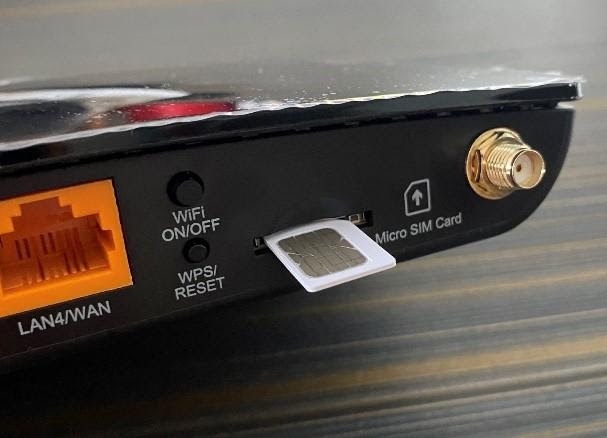
STEP 2
Once your SIM is installed, position your modem near a window where it will be able to receive the strongest possible signal from the network.
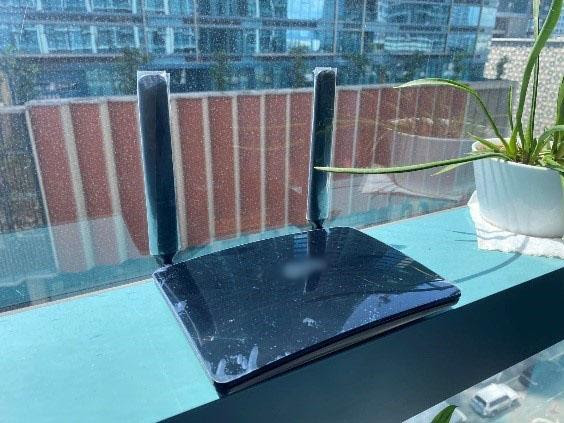
STEP 3
Plug in your modem and turn it on.
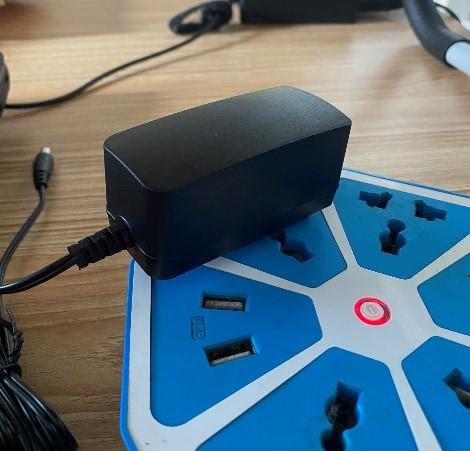
STEP 4
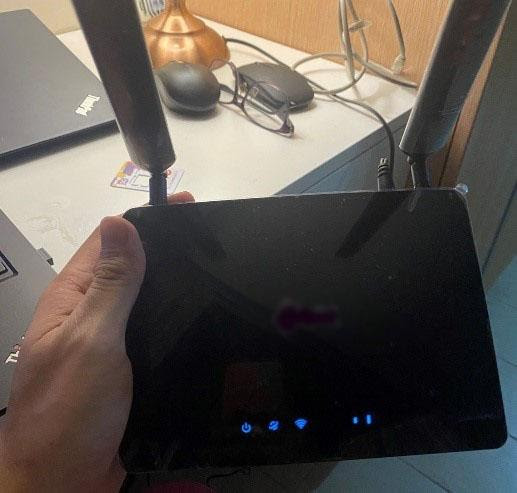
Once your modem finishes booting up, check if all the status icons are lit green. Check if the signal indicator (there are usually three to five escalating bars that indicate your signal strength) is also lit. If it is, you may now connect to your modem via LAN or WIFI and access the internet.
***Tip: Some modems will require you to fill in the “APN Setup”, you can use this configuration for the APN settings:
Name: DITO Internet
APN: internet.dito.ph
STEP 4.1
In case you encounter a problem connecting to the DITO Network, you may need to establish a connection manually.
a. Check your broadband device's manual for the IP address of its device management/ configuration page (it’s usually 192.168.1.1 or a similar format). Access this page via LAN or WiFi.
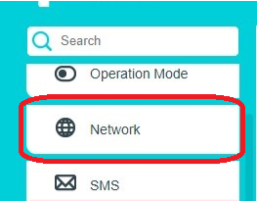
b. Go to Advance > Network > Internet
c. Create a Profile and fill in the necessary fields with these details:
Profile Name: DITO Internet
APN Type: Static
APN: internet.dito.ph
- Check your modem’s instruction manual for the trigger of the release mechanism and initiate the release (for instance, for most devices, pushing gently against the installed DITO SIM triggers the release mechanism).
- Carefully remove the DITO SIM and store it in a safe place.
Step 1
Locate the SIM card slot on the device and install your SIM. Make sure to use only the correct SIM card size (micro, nano, etc).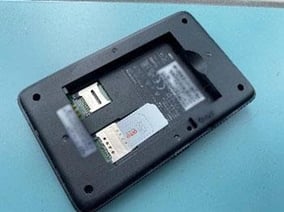
Step 2
Replace the battery and cover.
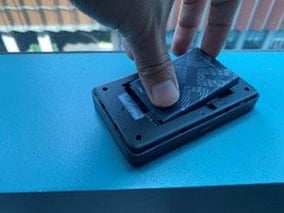
Step 3
Press and hold the Power Button until the welcome screen of the device appears
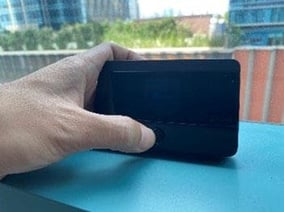
Step 4
Check the status in the welcome screen. Once it shows DITO as the network name and the signal bars appear on the upper left side of the screen, you can now connect to your device and use the internet.
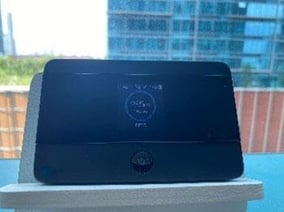
Step 1
Turn off the device and remove the back cover.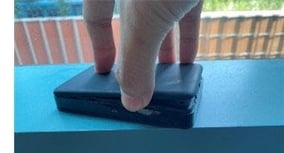
Step 2
Remove the battery.
Step 3
Carefully remove the SIM card from the card slot.
Step 1
Press the Menu button on your mobile WiFi. The Menu button serves as your cursor in navigating the built-in functions of the device while the Power button is used to select functions.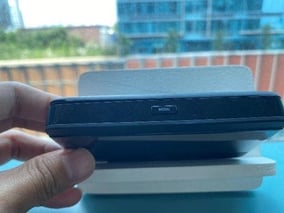
Step 2
Navigate through to the Device Info function of the device and select.
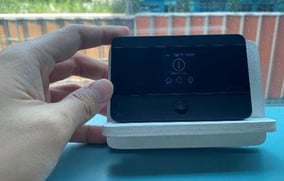
Step 3
The Device Info function will display the WiFi log-in details.
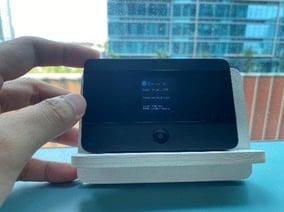
No! We’ve made sure it’s hassle-free. Your DITO SIM will be activated as soon as you insert it into your device and turn it on.
After installing and activating your DITO SIM, connect to your modem or pocket WiFi through the following methods:
Through a LAN port (using a desktop or laptop computer)
- Using an RJ-45 cable included with your modem, connect one end to the modem’s LAN port and the other end to your computer’s LAN port.
- Wait for your computer to detect the new connection and check the notification area of your task bar for confirmation that you are now connected to the internet.
- Once connected, you can start enjoying high-speed internet connectivity via the DITO network!
Through WiFi
- Set up your wireless connection in your device by navigating to the Settings section
- Choose WiFi or Wireless & Networks
- Choose your modem’s wireless network from the list (this is usually your modem’s brand or model number)
- If prompted for the WiFi name and password,
- use the details printed on the product label of your modem (“WiFi Name/SSID” and “WiFi Password”
- Click Connect
- Once connected, you can start enjoying high-speed internet connectivity via the DITO network!
You can manage your DITO subscription conveniently in one place by downloading and signing in to the DITO App using your mobile device. Sign in to your number by using the default password sent via the Welcome Message to your broadband device’s inbox. You don’t need to transfer your DITO SIM from the modem to your handset when you sign in.
Here’s how to sign in to the DITO App:
Step 1
Download the DITO App from the Google Play Store, Apple App Store, or Huawei AppGallery to install it onto your mobile device.



Step 2
Check your broadband device's manual for the IP address of its device management/ configuration page (it’s usually 192.168.1.1 or a similar format). Access this page through the WiFi or LAN connection. Look for the SMS/Messaging Application and locate the message that contains your default DITO App password.
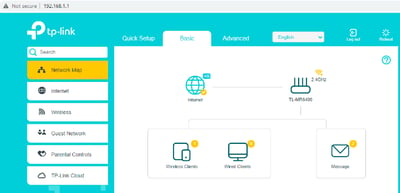
Step 3
Run the DITO App that you installed on your mobile device and follow these steps:
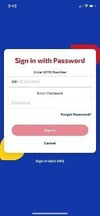
Sign in with your DITO number:
- Tap “Sign in with your DITO Number”
- Enter the mobile number indicated in your SIM card’s bed. (In this example, there is a 09 already in the query box. Simply omit the first “9” in your DITO number then type in the rest)
- Key in the default password that was sent to your broadband device’s SMS/Messaging Application.
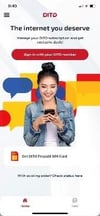
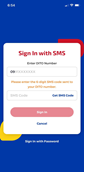
Sign in via SMS:
- Tap “Sign with SMS”.
- Enter the mobile number indicated in your SIM card’s bed. (In this example, there is a 09 already in the query box. Simply omit the first “9” in your DITO number then type in the rest).
- Click “Get SMS Code”.
- Key in the 6-digit authentication code that was sent to your device’s SMS/Messaging Application.
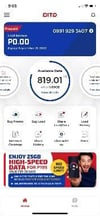
Step 4
Once logged in, you will be directed to the DITO App home page where you can see your available data and usage anytime, anywhere.
SOME BASIC TROUBLESHOOTING:
My signal bar doesn't light up.
Try moving your modem closer to the window to get a better signal reception. Signal can be quite weak if the modem is surrounded by many objects like walls and furniture.
My modem is connected but I cannot access the internet.
Try to do a power cycle by switching your device off and turning it back on after around 10 seconds. Check if the signal bar has lit up. Repeat the process until the issue is resolved.
I’m experiencing slow to no internet connection.
First, check if there are any objects interfering with the device that may cause this issue (e.g. aquariums, microwave ovens, TVs and other radio- emitting devices). Try to do a power cycle by switching your device off and turning it back on. Do this again if the issue is not resolved. You can also try re-positioning your modem closer to a window to get the strongest signal possible.
I forgot my modem’s WiFi password.
Try to do the following:
- Check your modem’s manual for the IP address of its device management or configuration page (usually written in this format - 192.168.1.1). Access this page through a LAN connection and locate your WiFi password on the Settings.
- Alternatively, you can try pressing the modem’s Reset Button and restore the device to its factory settings. The default password can be found on the product label.
- If the product label is no longer found, contact your modem’s manufacturer for technical support.
Some connection problems may be due to a faulty SIM. To check if your SIM is faulty, try to insert it in another device (such as a compatible mobile device) to see if it can receive a signal. If your SIM is not faulty, the problem may be with your broadband device or router. Please reach out to your device manufacturer’s technical support for any hardware-related problems that could possibly be interrupting your service.
How do I access the GUI of the TPLink TL-MR6400 modem?
To access the device’s Graphic User Interface, please do the following:
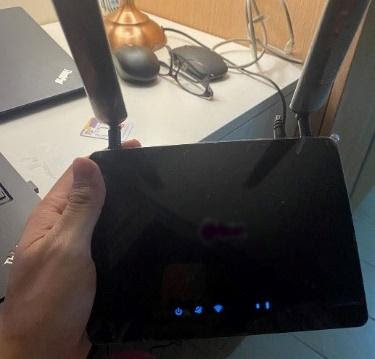
Step 1
Turn on your modem and connect to it via LAN or WiFi
Wired (LAN), Wireless (WiFi)
Step 2
Once connected, find the Management IP Address of your device. It is usually printed on the device label along with the default WiFi password.
Wired (LAN), Wireless (WiFi)
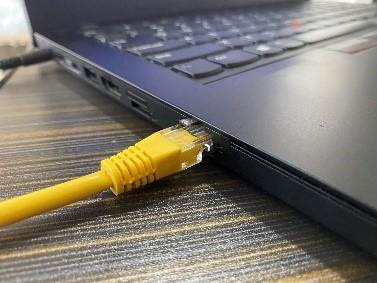
Step 3
With any Web browser, key in the Management IP Address of your device in the address bar (e.g., 192.168.1.1)
Wired (LAN), Wireless (WiFi)

Step 4
You will now be prompted to the Authentication Page. For some modems, it will require you to set up your own password for first time log-in.
Wired (LAN), Wireless (WiFi)
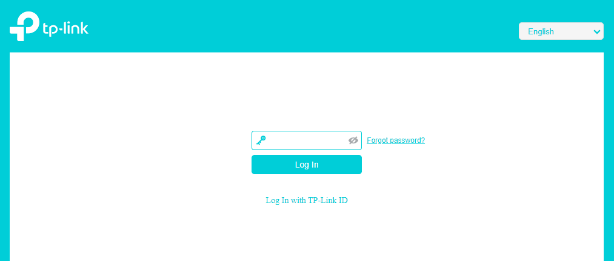
Step 5
Once logged in, you will now be able to see the main Graphical User Interface (GUI) of your modem.
Wired (LAN), Wireless (WiFi)
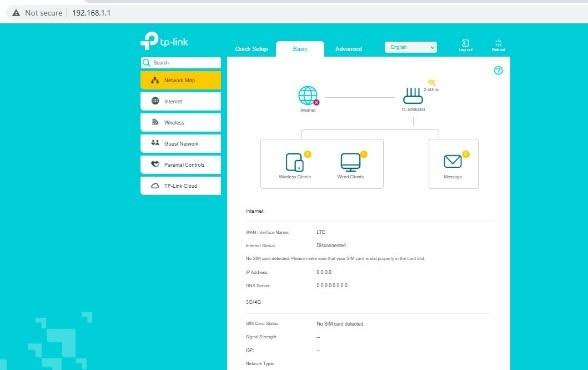
How do I locate the TPLink TL-MR6400 modem’s SMS Inbox?
To access the device’s Graphic User Interface, please do the following:
Step 1
Log in to your modem's GUI or main menu.
Step 2
Click on the ADVANCED option in the menu.
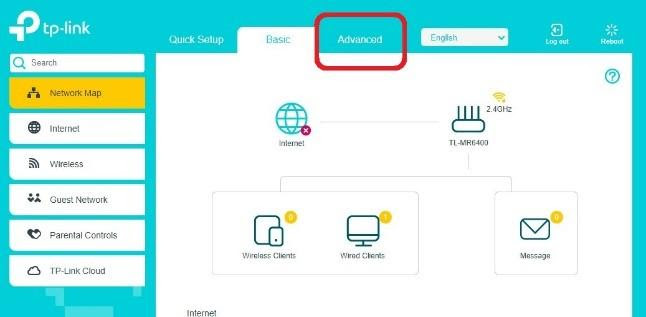
Step 3
You will be routed to a page that shows all ADVANCED functions. Look for the SMS/MESSAGING option.
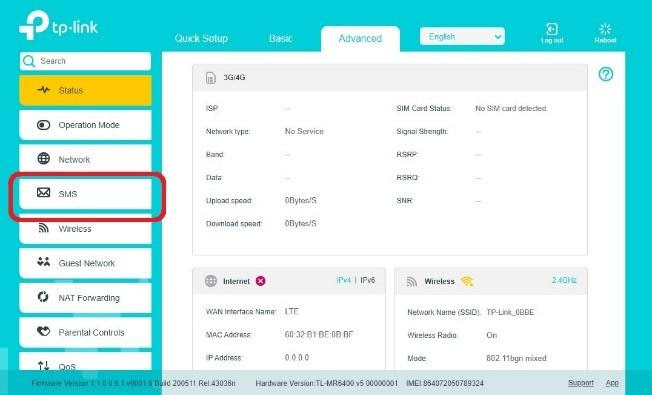
Step 4
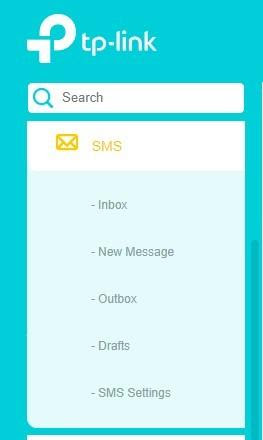
Select the SMS/MESSAGING option. This will display all related functions under SMS/MESSAGING, such as the Inbox, New Message, Outbox, Drafts, and SMS Settings. Through this, you may check the messages in your DITO SIM.
How do I change the TPLink TL-MR6400 modem’s WiFi Settings?
To access the device’s Graphic User Interface, please do the following:
Step 1
Log in to your modem's GUI or main menu.
Step 2
Click on the ADVANCED option in the menu.
Step 3
Click on the WIRELESS option.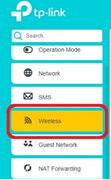
Step 4
The WIRELESS option displays all related functions such as Wireless Settings, WPS and Wireless Schedule. Click on WIRELESS SETTINGS, which lets you modify your WiFi name and password by following these steps:
a. Look for SSID or Network Name to change your WiFi network’s name.
b. Look for Password if you want to change your WiFi password
c. After changing these settings, Click APPLY.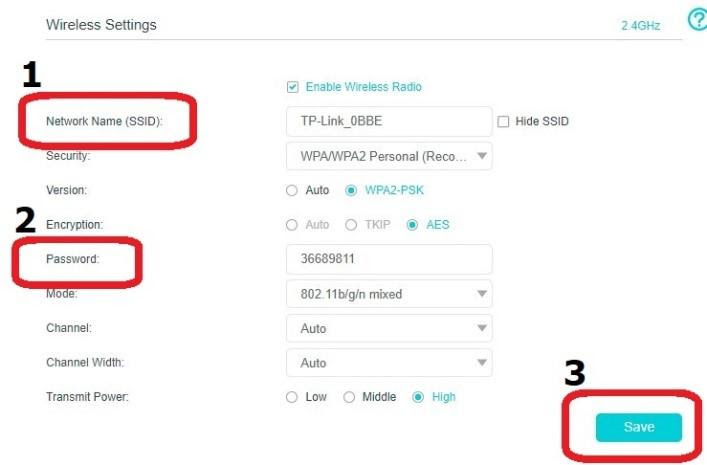
Step 5
After making these changes, try to check if you can find your new WiFi network in the list of discoverable networks and try connecting with your new WiFi password. Once successfully logged in, you are now ready to use the internet.
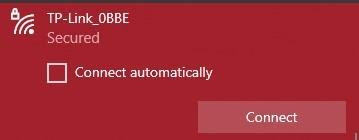
How do I access the GUI of the TPLink M7350 mobile WiFi?
You’ll need to install the tpMiFi device management app. Please follow the steps below:
Step 1
In the device menu, locate the QR code that will help you download the app after scanning it. Alternatively, you can download the tpMiFi app directly from the Google Play Store or Apple App Store.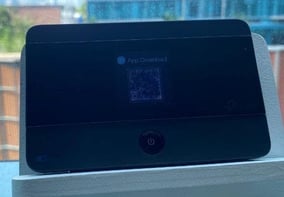
Step 2
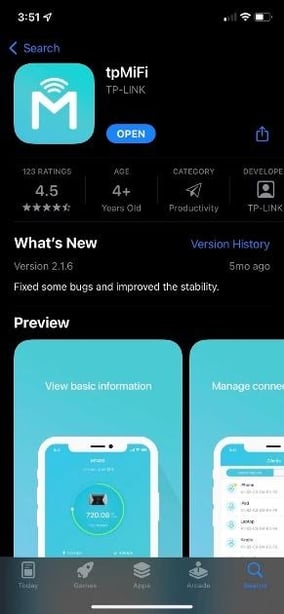
Install the tpMiFi app on your device.
Step 3
After installation, open the app and wait for it to automatically scan for the Pocket WiFi (make sure your mobile device is connected to the M7350).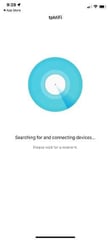
Step 4
Once the M7350 is detected, the app will open the device management page (which is its default page).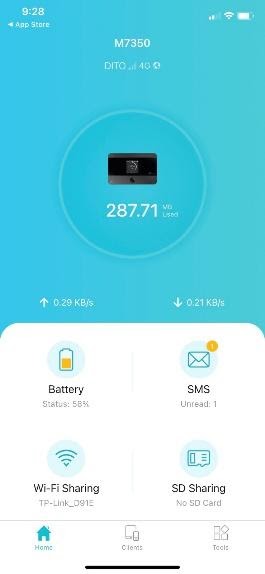
How do I locate the TPLink M7350's SMS Inbox?
Step 1
On the M7350's default page on the tpMiFi app, click on SMS.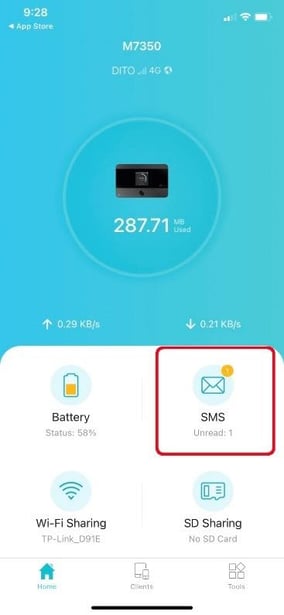
Step 2
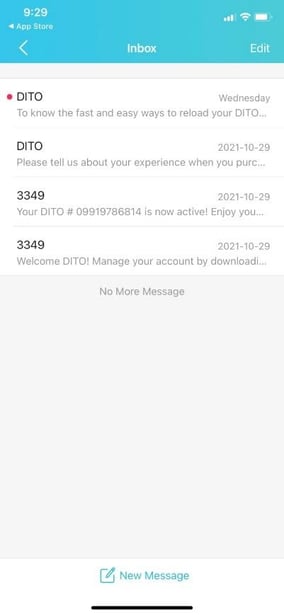
The SMS Inbox will open and you’ll be able to access your messages.
Our regular charges are as follows:
DITO to DITO Text - P1.00/text
DITO to DITO Call - P6.50/minute
DITO Texts to other mobile networks - P1.00/text
DITO Calls to other mobile networks - P7.50/minute
DITO Calls to Landlines - P7.50/minute
Click here to see our standard rate for International texts.
<+> <Country Code> <Area Code> <Phone Number>
<00> <Country Code> <Area Code> <Phone Number>
<+> <Country Code> <Area Code> <Phone Number>
<00> <Country Code> <Area Code> <Phone Number>
Yes, you may already connect with subscribers from the other networks.
The call will be forwarded to your designated number after 20 seconds of ringing. If your designated number is a DITO number, you will be charged P6.50 per minute. If your designated number is a number from another network, you will be charged P7.50 per minute. The total charge will depend on the duration of the forwarded call.
ViLTE calls are now available through other networks. But limited based on the promo or plan you choose.
-
150 mins calls to other mobile networks
-
300 mins calls to other mobile networks
Note: At this time, video over LTE is not supported in Huawei devices.
The DITO App can be found in your confirmation email and welcome text upon purchase of your DITO SIM. Download now so you can manage your account, check your balance, monitor your data usage, calls, texts and purchase load and other exclusive promo packages.
- You can download the DITO App via the link indicated in the welcome text and email that you will receive upon SIM activation.
- You may choose to download from Google Play Store, App Store, or Huawei AppGallery
- After completing the installation process, you just need to click the DITO icon from your home screen and launch the app.
Note: The DITO App only works with DITO compatible VoLTE phones with OS (Operating System) Android 6.0 and above. Kindly check the compatible mobile phones via this link.
Yes, you can. You may select your preferred number up to seven (7) digits via the DITO App. However, if the number you have selected is not available, you may refer to the options automatically suggested by the DITO App.
This feature is for free when you avail your new DITO Prepaid SIM Card via the DITO App. The DITO SIM is preloaded with 25GB High-Speed Data, Unlimited texts to all networks, Unlimited DITO-to-DITO calls and 300-mins of calls to other mobile networks for only P199 valid for 30 days.
For new customers, you may download the DITO App via Google Playstore or Huawei App Gallery to purchase your DITO Prepaid SIM Card and select your preferred number.
For existing customers, you may access your DITO App. Before signing in, click on the Get DITO Prepaid SIM Card option to purchase your new DITO SIM with your preferred number.
Our estimated delivery lead time:
- 1) NCR: 2-4 business days
- 2) North Luzon/South Luzon: 3-5 business days
- 3) Visayas: 2-5 calendar days
- 4) Mindanao: 2-5 calendar days
You can check your order status via the link provided in the confirmation email or just visit the DITO App and track your order.
We have specific guidelines and policies on site acquisition or land rentals. Click here to find out more.
We have 3 available DITO App Booster Packs - the Live It App Booster Pack, the Play It App Booster Pack, and the Work It App Booster Pack.
The DITO App Booster Packs are add-on data packages designed to give you access to apps most relevant to your needs.
The Live It App Booster Pack includes Facebook, Messenger, Instagram, WhatsApp, Viber, Kumu, YouTube, Tiktok, Twitter, Lazada, and Shopee.
The Play It App Booster Pack includes Vivamax, WeTV, YouTube, Mobile Legends, Call of Duty, AOV, Facebook, Messenger, Instagram, Tiktok, Viber, and Twitter.
The Work It App Booster Pack includes Microsoft 365, MS Teams, Google Classroom, Luna Academy, YouTube, Viber, WhatsApp, Facebook, Messenger, Google Maps, Waze, Lalamove, and Grab.
The DITO App Booster Packs are priced at P50. It can be a stand-alone data package or an add-on to DITO Level-Up Packs.
If you are subscribed to a DITO Level-Up Pack, the DITO App Booster Pack's validity will end at the same time as your DITO Level-Up Pack or 7 days after subscription, whichever is longer. It comes with 7GB app-specific access + 1GB open access data.
If you don't have any active DITO Level-Up Pack subscription with your current prepaid number, you can choose to subscribe to a 7-day pack: 7GB app-specific access + 1GB open access data.
Promo runs from April 27, 2022 to July 1, 2026.
The DITO App Booster Packs is exclusively available for select DITO subscribers who have received SMS notifications. You can click on the link on the notification to avail of these services.
DITO App Booster Pack is exclusively available for select DITO subscribers who have received SMS notifications. If you did not receive an SMS notification, we recommend that you avail any of our DITO Level Up Packs instead.
Yes, you can resubscribe to the DITO App Booster Packs even if you still have a current DITO App Booster Pack subscription, however, inclusions will not stack and rollover to the expiry date of your new subscription. Consumption of data will be based on the shortest validitiy. You can monitor the respective expiration dates of your multiple subscriptions via the DITO APP.
Yes, you can subscribe to the DITO App Booster Packs even if you are currently subscribed to any DITO Level-Up Packs.
Yes, you can subscribe to DITO 99/DITO 199 even if you are currently subscribed to a DITO App Booster Pack, however, inclusions will not stack and rollover to the expiry date of your new DITO 99/DITO 199 subscription. Consumption of data will be based on the shortest validitiy. You can monitor the respective expiration dates of your multiple subscriptions via the DITO APP.
Yes, you can subscribe to more than one DITO App Booster Pack, however, inclusions will not stack and rollover to the expiry date of your new DITO App Booster Pack subscription.
The NEW DITO Data Sachet promos are new bite-size promos that allow you to enjoy all-access data for as low as P10, valid for 1 day.
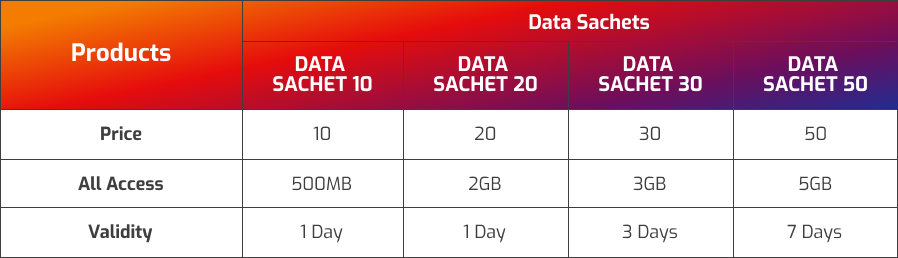
The NEW DITO Data Sachet promos are available to ALL DITO mobile prepaid subscribers.
You can purchase the NEW DITO Data Sachet promos in the DITO App and from DITO Authorized Retailers and Partner Stores.
For Digital Channels like Gcash, Maya, etc., only the Data Sachet 50 is available.
If you have multiple promo subscriptions and your data allowances are in separate data wallets, your subscription with the shortest validity will be consumed first.
The remaining all-access data will not rollover to your new subscription and will expire at the end of the validity period.
The all-access data is not shareable with other DITO mobile prepaid subscribers.
You can avail any of the NEW DITO Data Sachet promos multiple times within the promo period.
 Get App
 Get SIM